





Back
7 min read
How to delegate your on-call workload to AI agents
Written by
 Varun KrovvidiProduct Marketing Manager
- Topic
- Product
During on-call rotations, dealing with the volume of alerts fills the shift. You assess alerts as they come in, rule out the noise, and dig into the few that are real. On-call is also supposed to include work that makes the next rotation easier, such as updating a runbook, tuning a noisy alert, or closing action items in your backlog. On a busy rotation, that work rarely happens.
At Resolve AI, we are building agents to run and fix your software. With Resolve AI, engineering teams can now delegate on-call to agents, co-work with agents to resolve incidents, and run operational tasks with background agents. In this blog, we will talk about how you can delegate your on-call workload to Resolve AI.
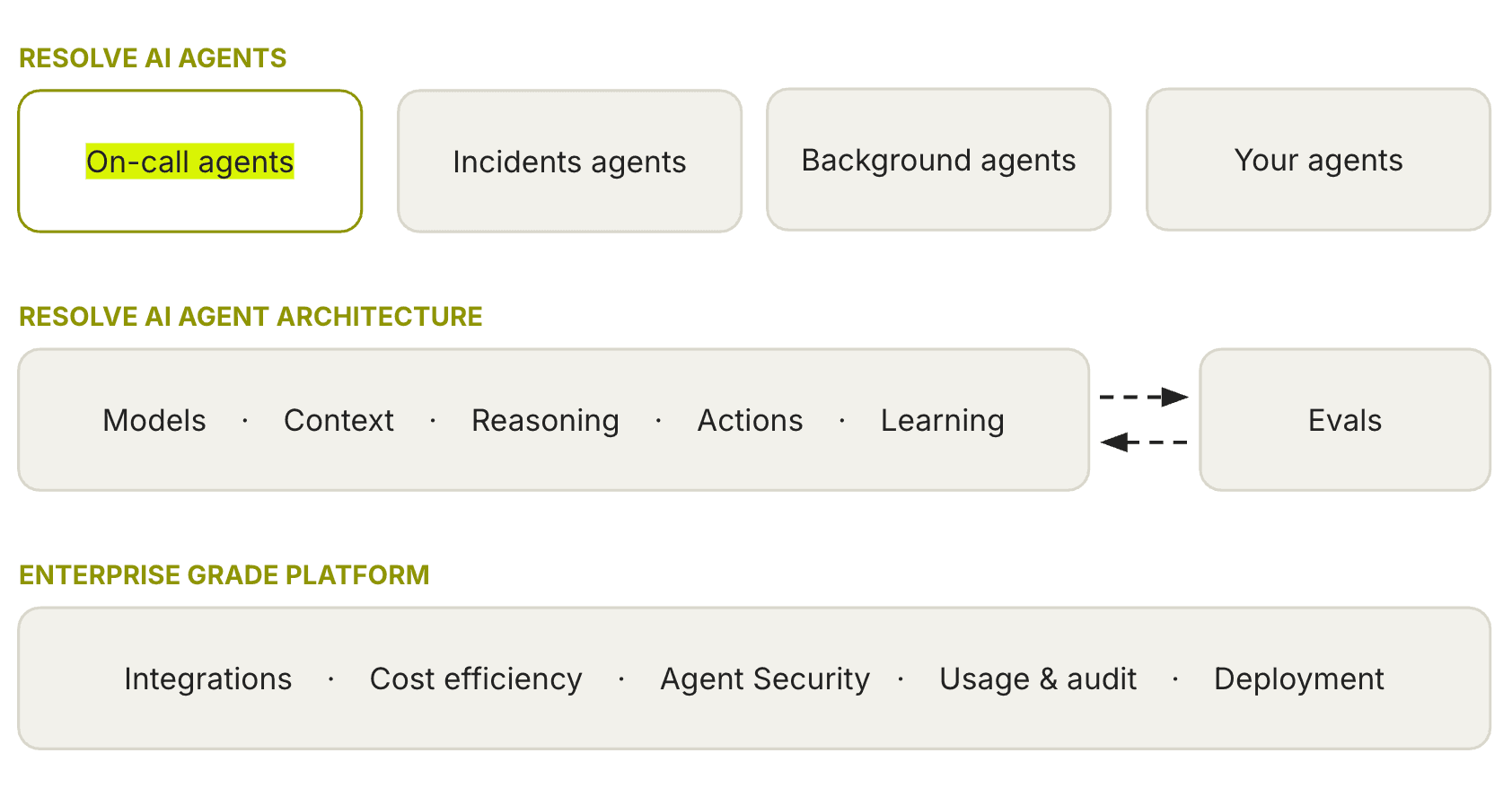
Resolve AI agents participate in every on-call rotation. They investigate and help you close the alerts that fire on your shift. You can also use Resolve AI for the work that makes every rotation better. Here’s how you can work with Resolve AI agents on your on-call rotations:
Handle the alerts that fire on your shift
1. Pick up alerts the moment they fire
Once you connect your integrations, you decide which alerts the agent watches. Scope it by service or severity so it triages and investigates the alerts you care about. You also pick the channels it works in (Ex: Slack channels, MS Teams, or even your own agents).
Every alert that matches your conditions gets picked up by the agents the instant it fires, around the clock. Resolve AI is in the channel your team already lives in, and you can pick up from the work where the agent is already underway.
For each alert, you also set how far the agent works before you step in. You can triage for a known alert to execute an existing runbook (Resolve AI can intelligently determine blast radius or impact without a runbook), or choose Investigation for a deep root-cause analysis, or leave it on Adaptive and let Resolve AI weigh the alert. The next two sections cover what each one gives you.
Tip: Decide where you want the journey to start. Resolve AI works in Slack and MS Teams, in the Resolve UI, on the CLI, and inside your own agents over MCP. Pick the surface that fits the alert and the way your team already works, rather than forcing everyone into a new console.
2. Triage the volume
Most alerts that fire will not result in an incident. But every alert you triage requires a decision: should you silence the alert, group it with a similar alert, route it to a different team, or continue with an exploratory investigation? Triage gives you that. You get an impact assessment, blast radius, and a decision on what to do next.
The agent gets there by following your runbook. If there is no existing runbook, Resolve AI interprets the alert context and assesses impact, or dismisses most low-severity alerts.
From that assessment, you get a recommendation to either silence the noise, run a known fix, or escalate for a deeper look. The agent posts the report to the surface you are working in: Slack, MS Teams, Resolve AI UI, or to your agent. You can choose to escalate an alert triage into a deeper (and open-ended) investigation.
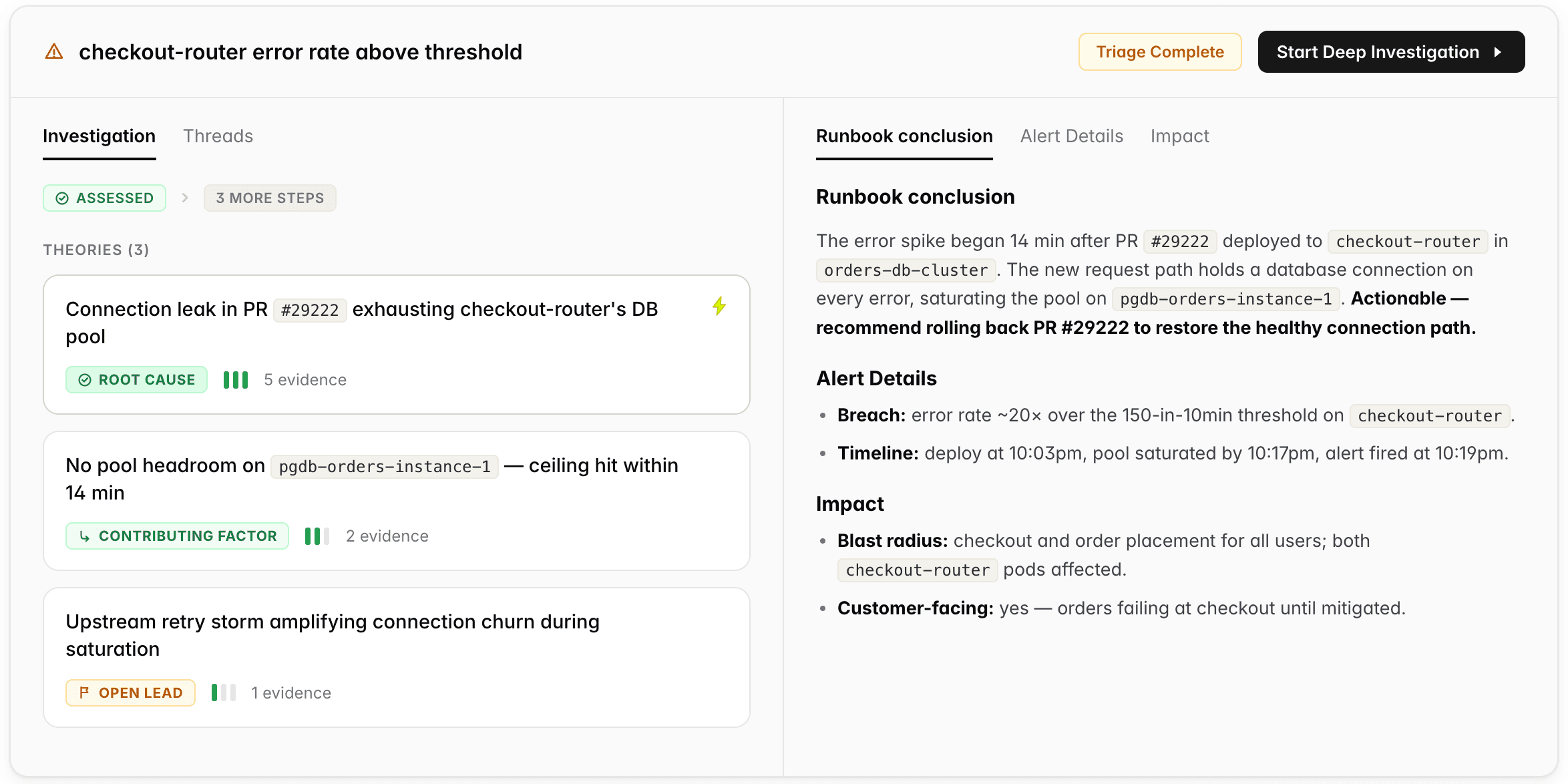
Tip: If you are not sure which mode an alert should run in, leave it on Adaptive. It weighs the alert and your team's past engagement with similar alerts and chooses the right level of effort for you, so you are not hand-tuning every alert.
3. Investigate the alerts that matter
When an alert requires more than a quick triage, you can continue by engaging Resolve AI for a deeper or exploratory investigation. A team of specialized agents runs the investigation in parallel. These agents pursue multiple hypotheses in parallel, collect evidence, and get you to the root cause. These teams of agents establish a causal chain of evidence that leads you to the root cause with high accuracy.
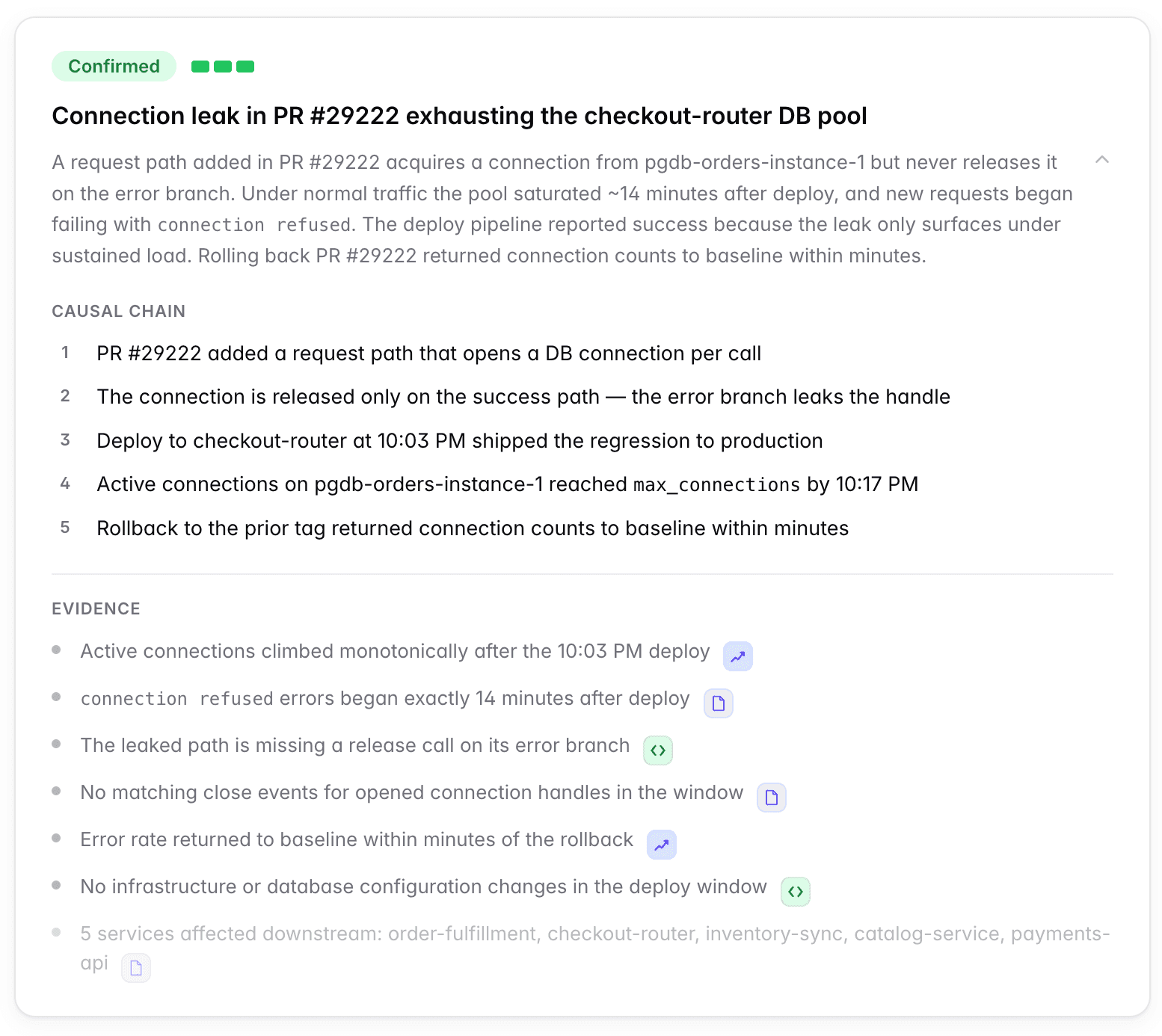
This is the same engine that helped DoorDash cut time to root cause by up to 87%, and that caught a DNS resolution issue at Zscaler more than two hours before a human incident bridge was created. _ Tip: Treat the investigation as something you work with, not something you wait on. Ask it questions and steer it when you have a hunch about where to look. You can keep an investigation private to you, or open it so your whole team works it together on a shared surface._
4. Approve the fix
Once the root cause is clear, Resolve AI even recommends the fix grounded in your production context. The proposal shows up in the investigation canvas, and in your Slack thread if the investigation is wired to one, with the action spelled out, the reason for it, and the details that matter like risk level, duration, and whether it can be reverted.
You can grant this safely because of how we built Resolve AI. Write credentials stay encrypted and are used only by the execution engine, and only after you approve. Every proposal is recorded: who suggested it, who approved or rejected it, and what it touched. Approved alert silences can be revoked at any time, which removes them from the monitoring platform immediately.
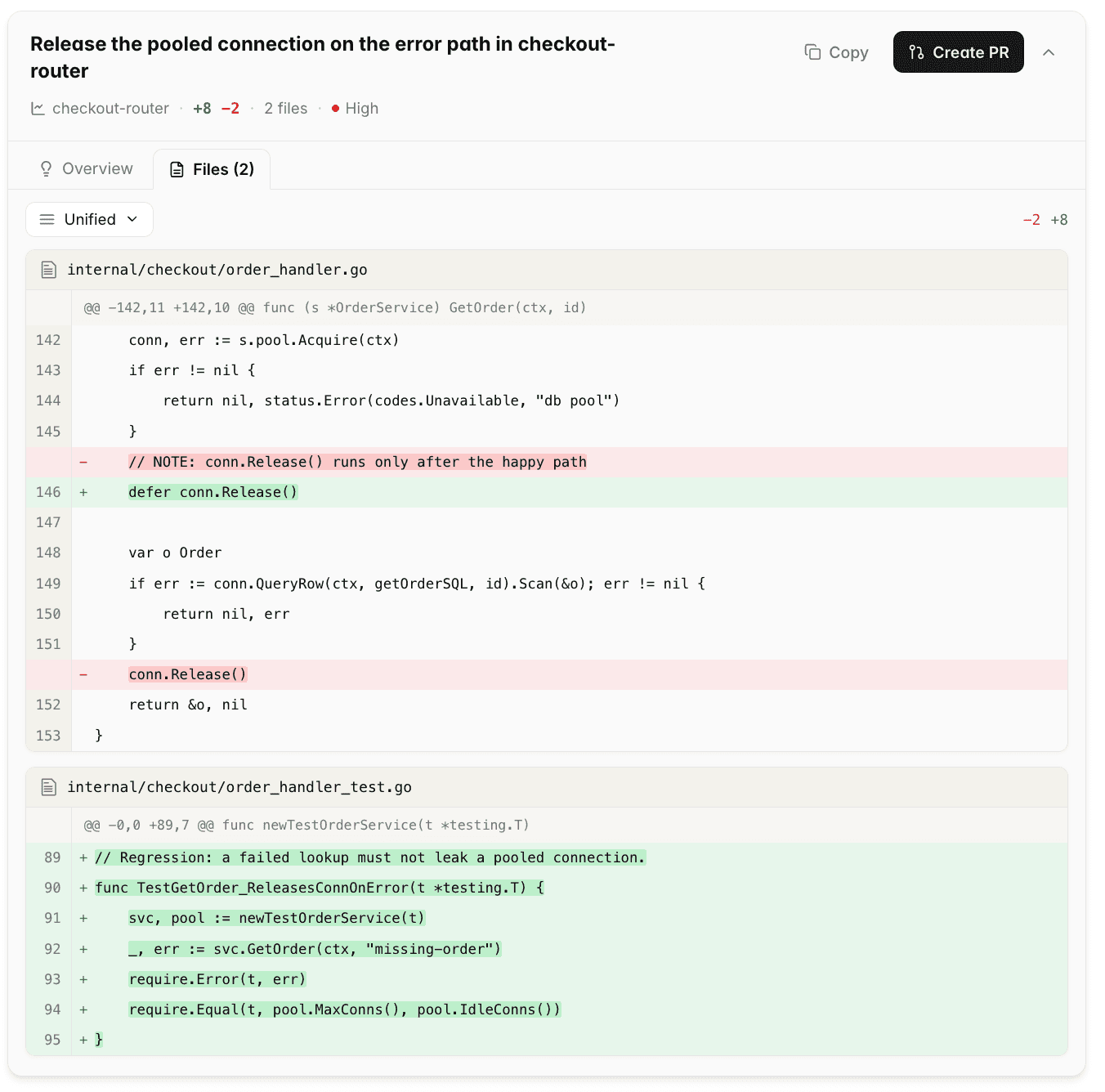
Tip: If you have configured write access for your own agents over MCP, Resolve AI's root cause and recommended fix become available to them directly. Your agent can take the mitigation Resolve AI found and run it where you already work, so investigation and action stay in one place.
Make the next on-call rotation quieter
Every alert you handle leaves something behind that could make the next one easier. Do it consistently and each rotation becomes quieter than the last. Neglect it and you get the failure mode most on-calls live in: the same alerts paging the same people, recurring issues investigated from scratch, and hard-won context walking out the door with whoever last held it. None of this work is ever urgent, which is why it has to be deliberate.
5. Document what happened
On-call produces a steady amount of writing: the handoff summary at the end of a shift, the status or breach report someone always needs, the post-mortem when an alert turns into an incident. The investigation canvas is already a running record of what happened, including the timeline, evidence, and actions taken. You can generate the document from that canvas in a chat and refine it in the same place, so the handoff writes itself from the shift's activity, and the next person starts with real context.
Tip: Encode your report and post-mortem templates as skills so the drafts come out in your house style. Your job becomes review and judgment, and not assembling the timeline from scratch.
6. Work the backlog
Improvement work disappears when no one owns it. Large teams keep a dedicated on-call backlog so these do not vanish, but a backlog only matters if it stays current and someone works it.
Resolve AI helps you attend to the backlog in a multi-turn chat: ask what is going on, get a fix proposed as a pull request grounded in your actual code, and track the action item in Linear where the team will see it. The recurring sweeps, like a weekly pass over open reliability items or a check on whether last month's noisy alert is still firing, can even be scheduled to run as background agents.
Tip: Connect your repositories and issue tracker so fixes land as PRs and follow-ups live in Linear. Point a background agent at the recurring reviews so the backlog gets worked even when no one remembers.
7. Teach Resolve AI what you learn
This is the work that makes Resolve AI better at your systems. After an investigation, you can update your knowledge and runbooks based on what Resolve AI found, as reviewable diffs. When you correct a finding or capture how your team approaches a class of problem, that correction becomes reusable in future investigations.
Every change goes through a human review gate, so your knowledge base reflects how your systems actually work. The agent that handles your hundredth alert understands your environment in ways it could not on day one.
Tip: Treat this like code review for how the agent thinks. Adopt a propose, review, merge loop for knowledge and skills so the improvements stay continuous and trusted.
Where this runs, and what comes next
Delegating on-call is you working with the agents through the life of an alert and the life of a rotation. Two threads run from here. When an alert pulls in more than one person, engineers and agents work the same investigation together in real time, which is “How to co-work with agents through an incident”.
AI for prod ebook
Learn how top engineering teams use AI to run production.
See the agents that run and fix software in action
Join our engineering leads for "Behind the Build", a webinar series deep-dive into how we built agents that run software.